
What Is the Best Local SEO Book?
There is no single best local SEO book. There is a best one for how you plan to work, and the honest...

Ryan McCain

H/T Caleb Ulku
If you’re using Screaming Frog but not sure what to do with all the data it spits out, you’re not alone. Most audits stop at surface-level metrics, leaving real SEO opportunities buried in spreadsheets.
That’s why we created the Norzer Screaming Frog Analysis Prompt for AI, a detailed breakdown of exactly what to look for when analyzing a site crawl. Whether you’re an SEO pro or an agency owner like us, this prompt helps you extract high-impact insights without missing a thing.
At Norzer, we use this AI prompt during every technical audit to quickly identify the stuff that actually moves the needle, like thin content, crawl waste, slow-loading pages, internal link issues, and missed schema opportunities. It’s not just about finding problems. It’s about spotting smart, strategic ways to grow.
This approach saves time, gives your audits structure, and makes you look sharp in front of clients (or your boss). It’s especially helpful for:
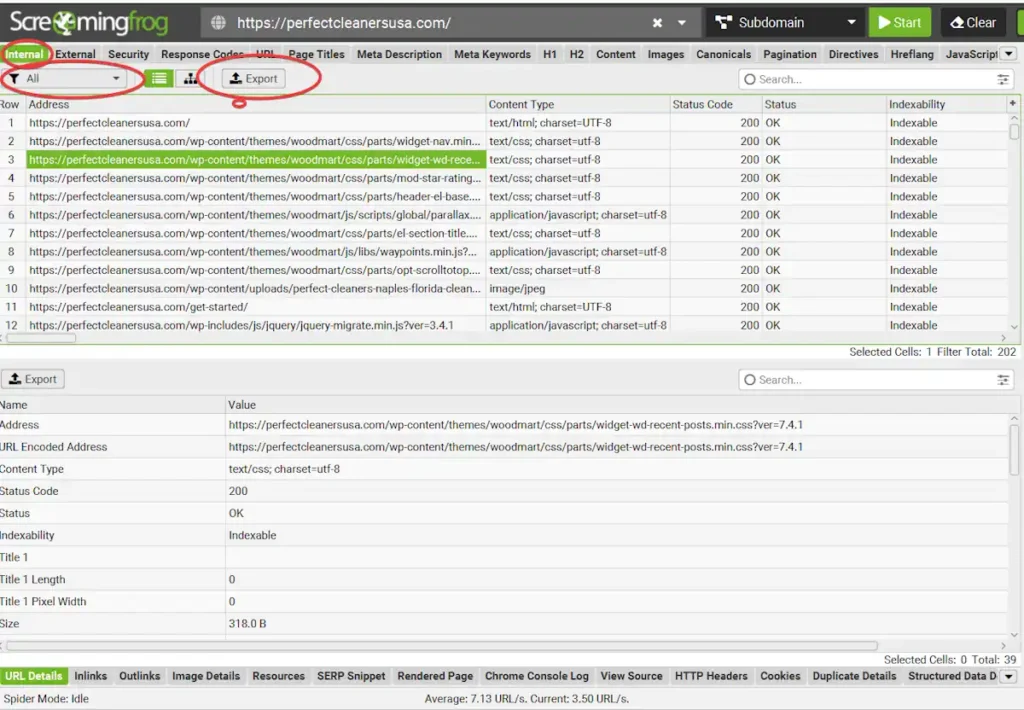
Below you will find the full Norzer Screaming Frog Analysis Prompt. You can copy it, customize it, or hand it directly to your team or contractor. It’s meant to be practical and action-ready. All you have to do is attach the .csv export from the Internal tab in Screaming Frog. Make sure All is selected in the drop-down list.
Please analyze the attached Screaming Frog export file and prepare a comprehensive SEO audit report focusing on the following critical technical and strategic issues:

**Analysis Requirements**

1. Thin Content Detection
Identify pages with minimal content (word count under 300 words)
Flag pages with low content-to-code ratio
Highlight pages with missing or sparse H1/H2 tags
Report on pages with unusually short meta descriptions or titles

2. Duplicate Content Issues
Find exact duplicate page titles across the site
Identify duplicate meta descriptions
Detect pages with identical or near-identical content
Flag potential canonical tag issues

3. Internal Link Structure Analysis
Map pages with excessive outbound internal links (over 100)
Identify orphaned pages (pages with no internal links pointing to them)
Find pages with very few inbound internal links
Analyze link depth and identify pages buried too deep in the site structure

4. Redirect Chain Problems
Identify redirect chains longer than 3 hops
Detect redirect loops
Flag temporary redirects (302s) that should be permanent (301s)
Calculate redirect response times and flag slow redirects

5. 404 Error Detection
List all pages returning 404 status codes
Identify internal links pointing to 404 pages
Find broken external links
Suggest pages that may need redirects to relevant content

6. Missing Meta Description Issues
Count and list pages without meta descriptions
Flag meta descriptions that are too short (under 120 characters) or too long (over 160 characters)
Highlight pages with duplicate meta descriptions

7. Title Tag Optimization
Identify pages with missing or duplicate title tags
Flag title tags that are too short (<30 characters) or too long (>60 characters)
Highlight title tags that don’t include primary keywords or intent

8. Image Optimization
List images missing ALT attributes
Identify images larger than 200 KB
Flag oversized or uncompressed images impacting load speed

9. Page Speed & Core Web Vitals (if available)
Flag pages with poor load times or high TTFB (time to first byte)
Identify large CSS/JS resources or render-blocking elements
Optional: Include any Lighthouse or CrUX metrics if available

10. Mobile-Friendliness Review
Flag pages with mobile usability issues (e.g., touch targets, viewport config, font size)
Highlight pages that fail mobile-friendly tests or create poor UX on small screens

11. Structured Data & Schema Markup
Identify pages missing structured data
Detect schema errors or warnings
Recommend relevant schema types (e.g., LocalBusiness, FAQ, Product, Review, Article)

12. Crawl Budget Waste
Flag non-indexable pages still being crawled
Identify duplicate or thin pages that should be blocked via robots.txt or set to noindex
Suggest crawl optimization opportunities

13. Sitemap & Robots.txt Review
Identify pages listed in the sitemap that are 404, redirected, or noindexed
Ensure all key indexable pages are included in the sitemap
Flag any critical pages being blocked by robots.txt unintentionally

14. Other
Identify any other opportunities or issues you see that we didnt' cover here.

**Output Format**

Please provide:
Executive Summary – Overview of main issues found with quantified impact
Detailed Findings – Specific examples and data for each issue category
Issue Matrix – Rank issues by SEO impact and ease of fix
Fix/Issue Recommendations – Clear steps to resolve each issue
Data Visualizations – Charts or visuals showing issue distribution
Appendix – Include raw data and detailed context

**Strategic Insight & Growth Opportunities**
In addition to the technical audit, please include any creative insights, untapped SEO angles, or niche content strategies that could help this business gain a competitive edge. This could include backlink ideas, local content gaps, schema enhancements, unique SERP opportunities, or anything else you believe would accelerate growth.