
Google Maps Ranking Signals: What to Do Now
The 72 Google Maps ranking signals that Search Engine Land reported this month point to one lesson f...

Ryan McCain

Your Google Search Console account already knows which searches you are showing up for and losing. An AI model can read that data in minutes and tell you which pages to build next, if you feed it the right files and ask the right questions.
A version of this workflow went viral this week: export three months of Search Console data, upload it to Claude, and let it find the queries your site never targeted. We tested it across Norzer client accounts. It works. It also has blind spots that matter most for the businesses we serve: new, local, owner-operated companies with thin data, where most customer searches happen in the map pack rather than the blue links.
Below is the full process, our rewritten prompt for local service businesses, and the rules we use to turn the output into pages that generate calls instead of pages that just exist.
A content gap is any search where Google already shows your site but no page on it is built to win. Search Console hands you the evidence. The analysis sorts it into four buckets:
The last bucket matters more every month. Google now answers many informational searches with an AI Overview before anyone scrolls, and fewer people click through. Pew Research Center tracked the browsing of 900 U.S. adults and found they clicked a traditional result on 8% of visits when an AI summary appeared, versus 15% when none did. Ahrefs found that an AI Overview now correlates with a 58% lower click-through rate for the top-ranking page.
The takeaway is not that SEO is dead. It is that the clearest, most direct answer is the one AI tools pull from, and tools like ChatGPT and Perplexity often name one or two businesses, not ten.
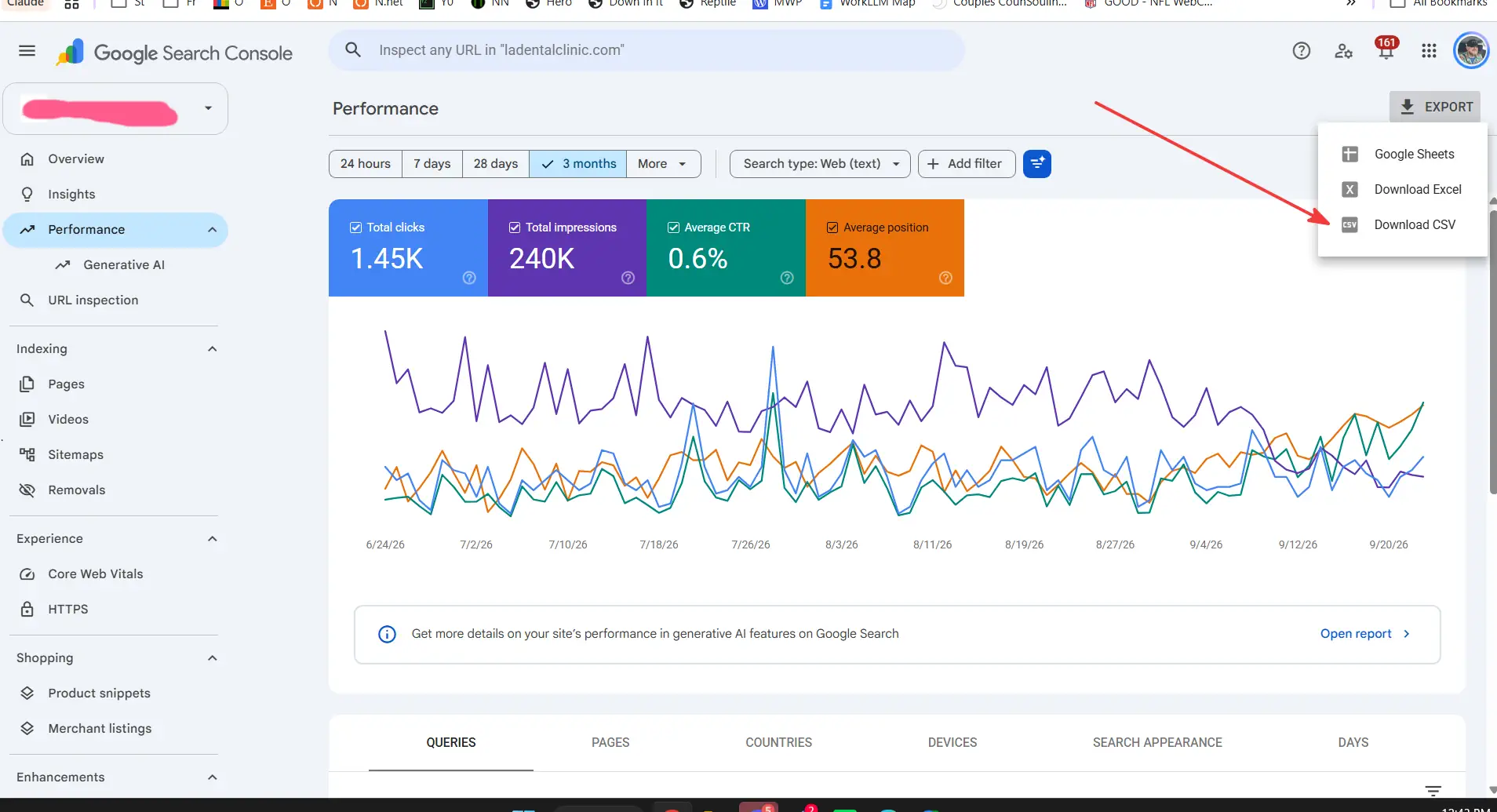
The whole export takes about two minutes.
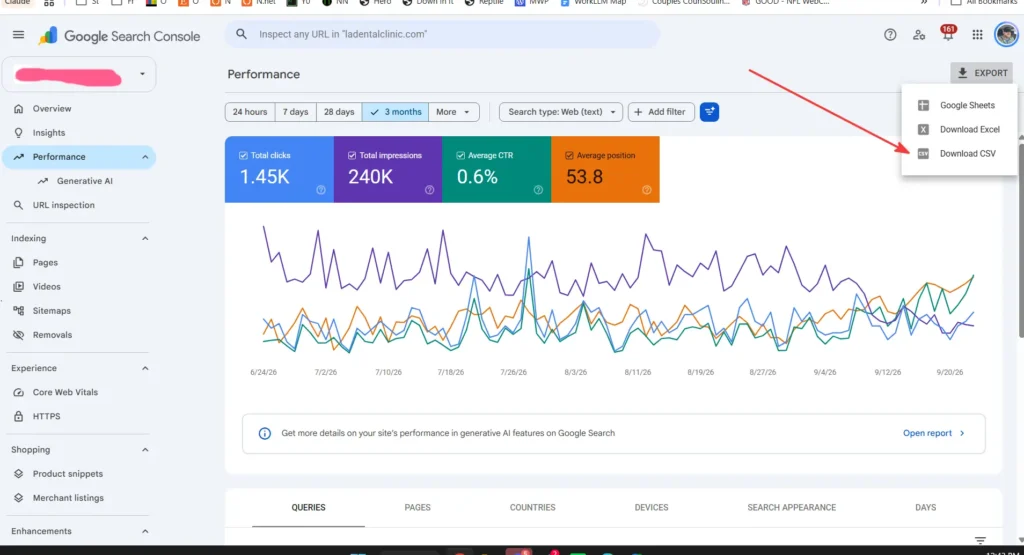
Two limits to know before you start. The Search Console table shows a maximum of 1,000 rows, and Google leaves rare queries out to protect searcher privacy, so your query totals will always run lower than your chart totals. Google explains both here. That is normal, not an error.
It also explains why small sites look thin. In Backlinko’s analysis of Search Console data across 4 million results, 90.3% of queries had 10 impressions or fewer. Most of your opportunity hides in the long tail.
Most versions of this prompt floating around are written for blogs and national websites. Ours is built for a local service business. It checks whether the data is strong enough to trust, sorts every query by buyer intent, and pushes your most profitable service to the top. Fill in the brackets before you paste it. You can find more prompts like this in our AI Prompts library.
ROLE
Act as the local SEO lead reviewing my Google Search Console data. Your job is to tell me which pages to build or fix next to win more phone calls, not more traffic.

ABOUT THE BUSINESS
Name and brand terms (leave these out of the analysis): [Business Name, owner name, common misspellings]
Core services: [service 1, service 2, service 3]
Home city and towns we serve: [e.g. Baton Rouge, Prairieville, Denham Springs, Zachary]
Services we do NOT offer: [list them so you never suggest pages for them]
Most profitable service: [the job we want more of]

THE FILES
Queries.csv and Pages.csv, exported from the Search Console Performance report. They are two separate tables with no shared key. When you connect a query to a URL, base it on the slug and page topic, and tag the match Confirmed or Guess.

STEP 1: CHECK THE DATA
Before any analysis, report the number of queries and pages, how many queries clear the impression floor, and whether there is enough data to trust the findings. If there is not, say so and stop.

STEP 2: SORT EVERY NON-BRANDED QUERY WITH AT LEAST [10] IMPRESSIONS
- Buyer intent: Hire (ready to call), Research (comparing or pricing), or Learn (unlikely to buy soon)
- Location: flag any query naming a city, town, or neighborhood, or using "near me"
- Opportunity type:
  - No page: the topic has impressions but nothing on the site targets it
  - Almost there: average position between 8 and 20
  - Losing clicks: CTR well below normal for its position, with the probable cause
  - Needs an answer page: how, what, why, cost, price, best, vs, or alternatives

STEP 3: GROUP AND RANK
Cluster related queries into topics. Rank clusters by buyer intent first, then impressions. Move anything tied to our most profitable service up. Only recommend a city-specific page when that location shows real impressions AND we actually serve it.

WHAT I WANT BACK
A. A prioritized table of topic clusters: total impressions, average position, intent, opportunity type, match confidence, recommended action (build a new page, strengthen an existing URL, or rewrite the title and description), and priority.
B. The five new pages worth building first: working title, target queries, and one sentence on what the searcher wants.
C. The five fastest fixes on existing pages: the URL, what is wrong, and the exact change.

GROUND RULES
Every number must come from my files. Do not estimate search volume, add keywords that are not in the data, or name competitors. If something is a judgment call, label it as one.
For a newer site, drop the impression floor from 10 to 5. Given how few queries on a small site ever reach 10 impressions, a higher floor can filter out the early signals that matter most.
The AI is only as good as the data, and the standard export has three gaps worth knowing.
The query-to-page match is a guess. Queries.csv and Pages.csv are separate tables. The AI infers which page ranks for which query from the URL and topic, which is why our prompt forces it to label every match. For the real mapping, filter the Performance report by a single page and export again, or pull query and page together through Looker Studio’s Search Console connector. Do this for your top five pages before rewriting anything.
It cannot see the map pack. Search Console reports organic web results. It does not include the searches that trigger your Google Business Profile. For a local service business, that is often where most calls come from. Pull the search terms from your Business Profile performance report too, and compare the two lists.
It does not know your competitors or your margins. A query with 400 impressions for a low-margin service can be worth less than one with 40 impressions for your most profitable job. The AI ranks by data. You rank by what actually pays the bills. Adjust the priority column before you build anything.
None of this is a reason to skip the workflow. It is a reason to treat the output as a first draft of a plan, not the plan.
A content gap analysis assumes Google already trusts your site enough to show it. For a business in its first months, the more common finding is not a gap. It is silence.
If your export shows almost no queries, the problem is upstream of content. Check these before building new pages:
Once those are in place, run the analysis every 90 days. The early exports show what Google is starting to associate you with, and that tells you where to double down.
The analysis is the easy part. What you build from it decides whether anything changes.
Start with quick wins. Small ranking moves pay off more than most owners expect. Backlinko’s study of 4 million search results found the top three spots take 54.4% of all clicks, moving from second to first brings 74.5% more clicks, and only 0.63% of searchers click anything on page two. The same study found titles between 40 and 60 characters earned the highest click-through rate. Title and meta description rewrites on pages that already rank take an hour. Do these before writing anything new.
Check the search results yourself. Before building a page, search the target query from your service area. If the top results are directories, government sites, or national brands, a new page may not be the right move. If they are local competitors with thin pages, you have an opening.
Do not let AI write the page in one shot. Use AI to find the gap, not to fill it. If a model can produce the page from a single prompt, so can every competitor with the same idea. Pages that rank include what only you know: real pricing ranges, local specifics, photos of your own work, and the reason customers pick you over the next option.
Resist the city page trap. The analysis will surface location queries. One or two strong pages for the cities that actually drive business beat twenty near-identical pages with the town name swapped out. Google’s spam policies specifically call out doorway pages built to rank for similar searches in different locations, and they can drag down the whole site.
Link the new page in. Connect it from the homepage or the relevant service page, and link back to your main service page from it. An orphaned page rarely ranks.
AI makes content gap analysis fast enough for any small business owner to run it in an afternoon. That is real progress. But the tool finds the gap. It does not close it, and it cannot see the parts of local search that often matter most: your Business Profile, your competitors, and which jobs actually make you money.
Run the export. Use the prompt. Then judge every recommendation against one question: will this page bring in a customer who is ready to call?
At Norzer, this kind of analysis runs inside one connected system: the website, hosting, Google Business Profile, and content all managed by the same team. When a gap shows up, no vendor handoff occurs. We build the page, link it in, and track whether it produces leads. For a look at what that compounding looks like in real Search Console numbers, see our Mizak & Pacetti case study, where daily clicks grew from 1 or 2 to an average of more than 20. Contact us today for a free consultation.